LEGO Block
Helping LEGO collectors find the right set at the right price.
A price-tracking platform that watches 5,893+ LEGO sets across retailers, so collectors can see whether a price is genuinely good — and where to buy. UX/UI redesign.
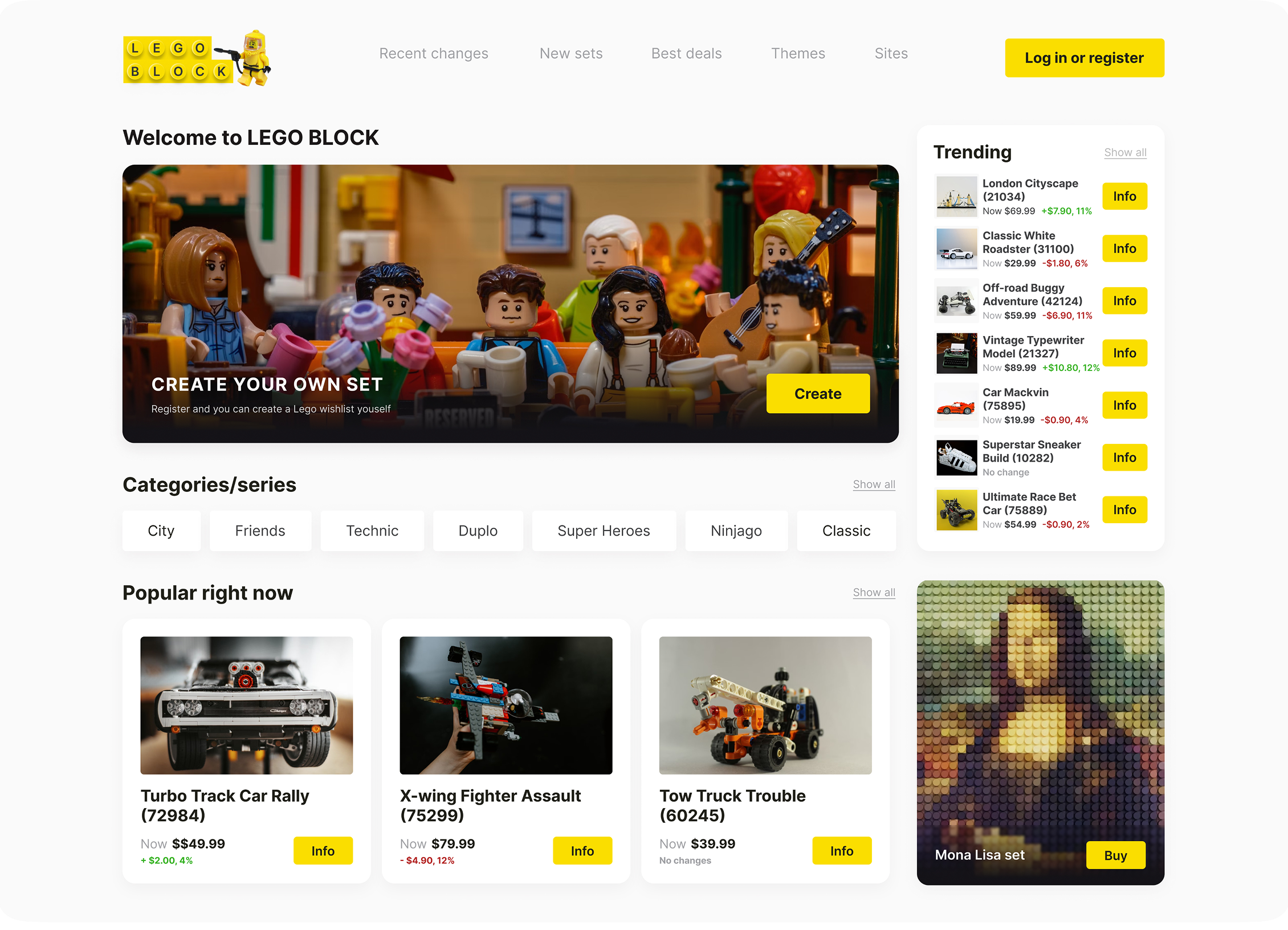
Overview
The challenge
The same LEGO set can cost very different amounts depending on the shop and the week. LEGO BLOCK follows the prices of 5,893+ sets across multiple retailers, so enthusiasts don’t have to. My job was to turn that pile of scattered price data into answers a collector can act on in seconds.
The existing solution was a manual process: collectors juggled retailer tabs and spreadsheets — opening multiple retailer sites, comparing prices, tracking changes over time — just to find the best price for one set. The goal was to design a platform that does all of that automatically and surfaces the right information at the right moment.
What “tracking a set” actually means
Tracking isn’t a single screen — it’s how every set is presented across the platform. Three layers turn raw prices into something a collector can trust.
-
1
Collect
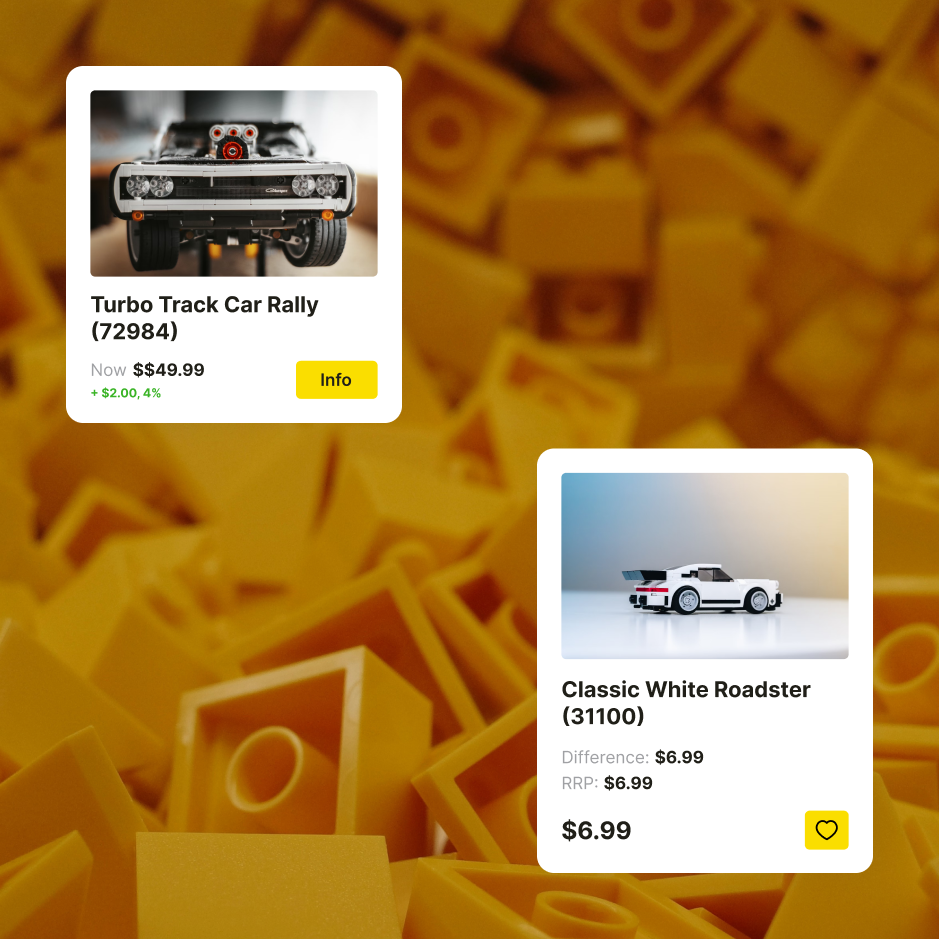
Each set shows its current prices from multiple retailers, lined up next to its recommended retail price (RRP).
-
2
Remember
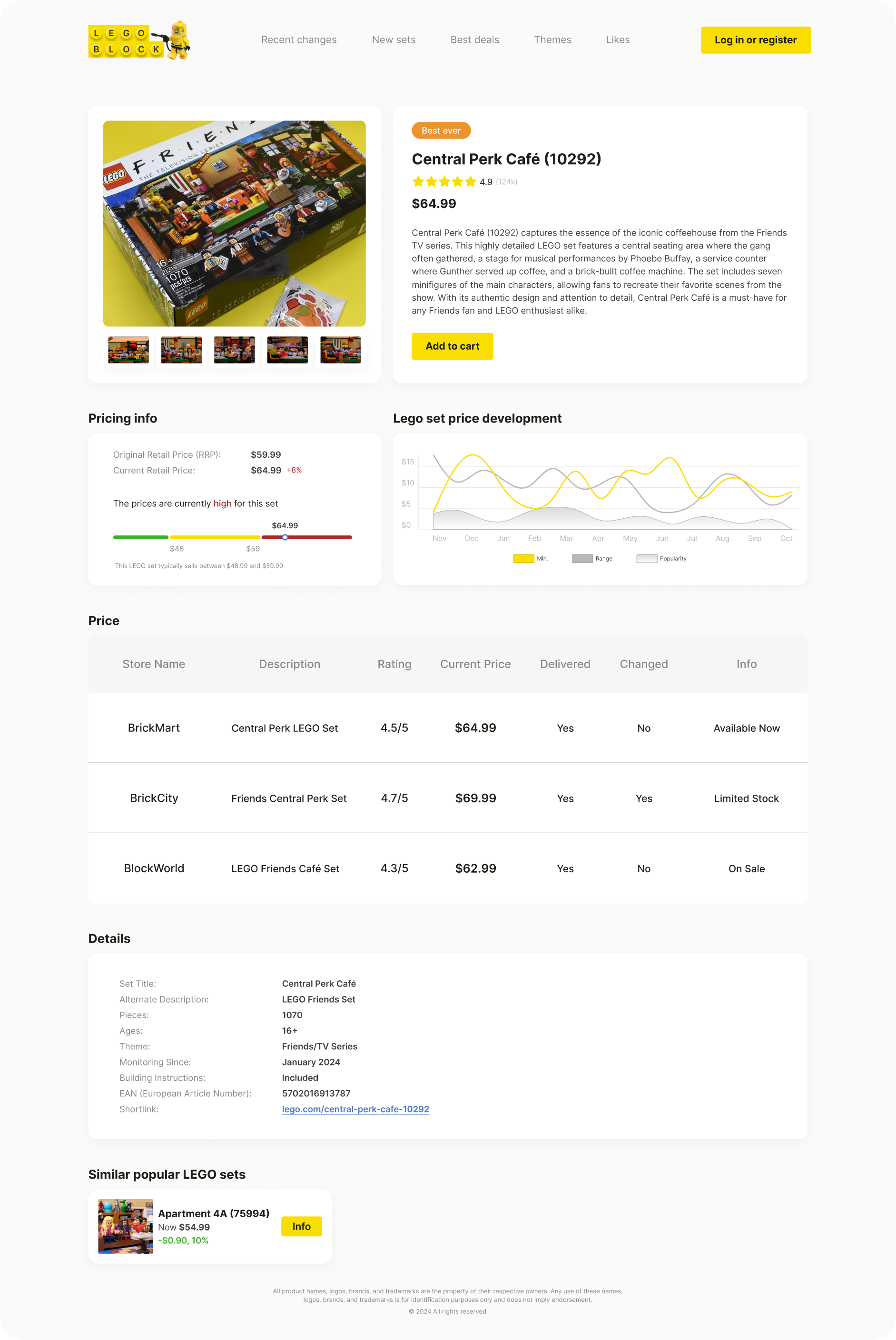
Each set has a price history chart — so “cheap” can be judged against the set’s own past, not a guess.
-
3
Surface
Changes come back as signals: green or red change badges, the Recent Changes feed, Best Deals rankings and the price chart on each set.
Reading a set at a glance
Every card and table in the platform uses the same four numbers, so once you learn them on one screen, you can read them everywhere.
- Now
- The current price shown for the set.
- Change
- How far the price moved, in $ and % — green when it’s cheaper, red when it went up.
- RRP
- The official retail price, the baseline every deal is measured against.
- Price per brick
- Price divided by piece count, to compare value across sets of different sizes.
Why a collector cares
Knows in one glance whether a “sale” is actually a deal — without opening ten retailer tabs.
Sees the full price history of a set before buying or selling, instead of relying on memory or spreadsheets.
Finds where a set is cheapest and what the total will be, so the gift is sorted in minutes.

Who it's for
Three collectors. Three different questions.
Based on data provided by the client, I defined three core user types with very different mental models and jobs-to-be-done. Rather than design for one generic “LEGO fan”, every page answers the question one of them walks in with.
The Casual Collector
“Is this a good deal right now?”
Browses for fun and buys when the price feels right. Has no patience for spreadsheets or ten open retailer tabs.
LEGO Block answers with
- Best Deals ranked by discount type
- Price-change badges on every set
- One tap to save a set for later
Problems solved for them → 01 · 04
The Serious Investor
“Where is this set’s price heading?”
Treats LEGO as an asset. Tracks retired sets over months and buys or sells on price history, not on impulse.
LEGO Block answers with
- Price history chart on every Set Overview
- Store-by-store comparison table
- Recent Changes feed of price movements
Problems solved for them → 02 · 03
The Gifter
“Which set should I buy — and where is it cheapest?”
Shopping for someone else, usually against a deadline. Knows the theme or the age, not the set number.
LEGO Block answers with
- Categories and themes on the home page
- Popular-right-now picks
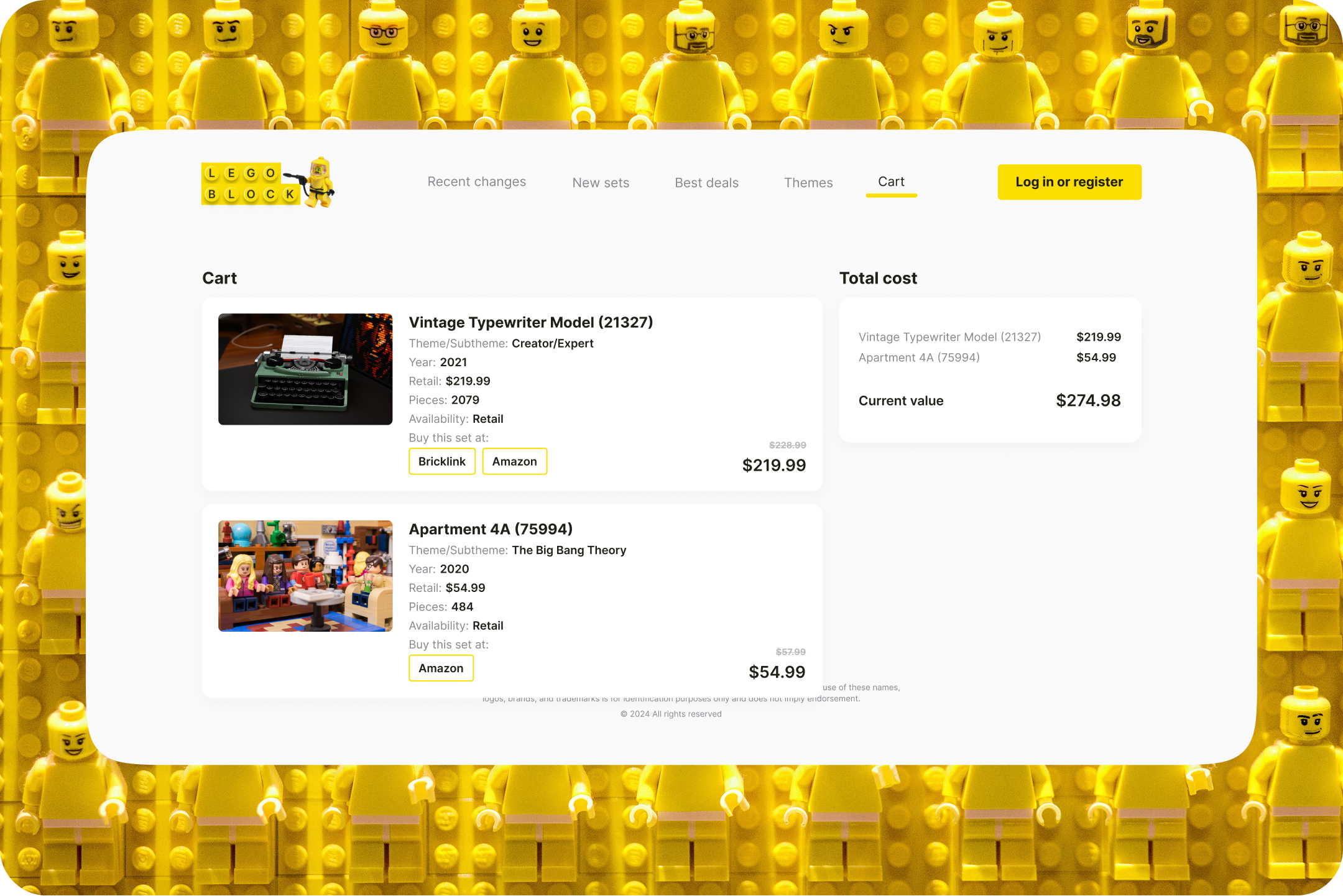
- Cart that compares total cost across retailers
Problems solved for them → 05
“Is this a good deal right now?”
They open LEGO Block on the sofa, scroll Best Deals and see at a glance which sets dropped and by how much. The green price-change badge does the maths for them — if it looks good, they save it and move on.
- Open Best Deals
- Scan the price-change badges
- Save the set they like
“Where is this set’s price heading?”
They go straight to a set’s overview: the price history chart shows how the price has moved, the store table shows who sells it cheapest, and Recent Changes shows the latest movements.
- Search a specific set
- Read the price history
- Compare stores before buying
“Which set should I buy — and where is it cheapest?”
They start from a theme on the home page, pick something from Popular right now, and add it to the cart — which shows where to buy it and what the total will be, so the gift is sorted in minutes.
- Pick a theme or category
- Choose from Popular right now
- Buy where it’s cheapest
Problem → Solution
Six problems the redesign had to solve.
Each screen starts from one collector’s question. Here is what got in the way of answering it, and the design decision that removed it.
A price with no reference point
A price on its own means nothing. Without a reference point, collectors open retailer after retailer just to check whether a discount is real.
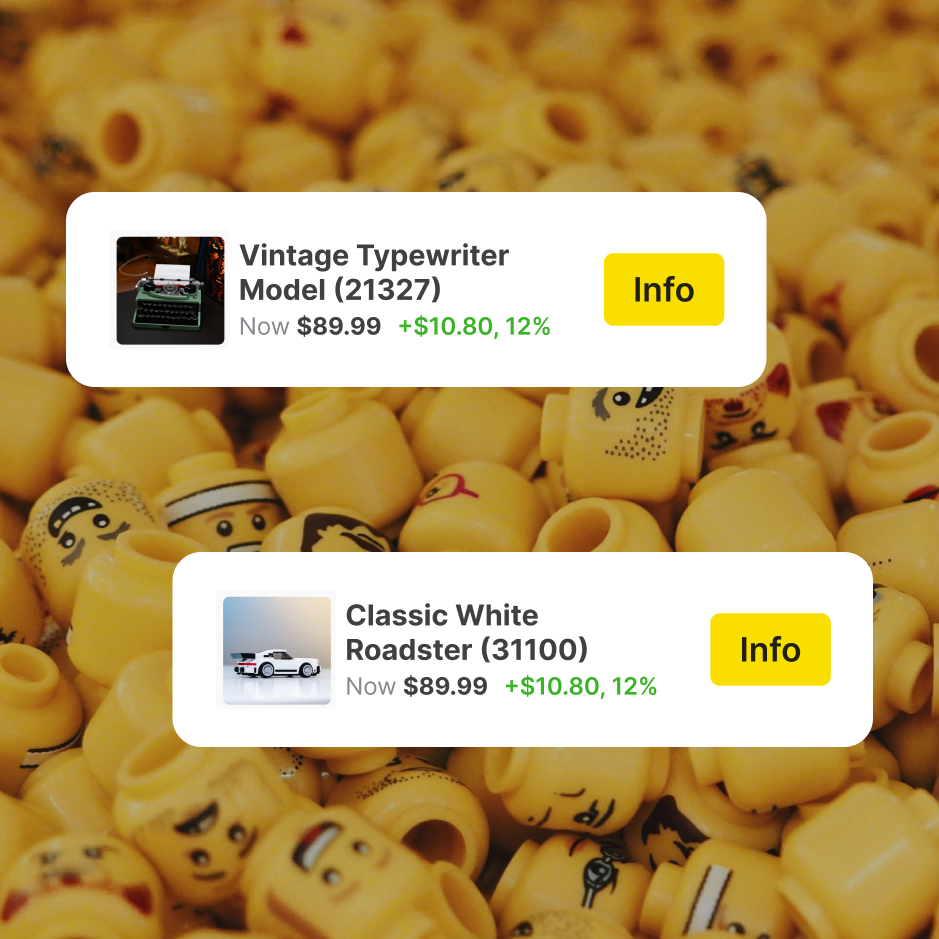
Every price carries its context
The current price sits right next to how far it moved — in $ and % — green when it drops, red when it rises. No maths, no extra tabs.
Price changes slip past unnoticed
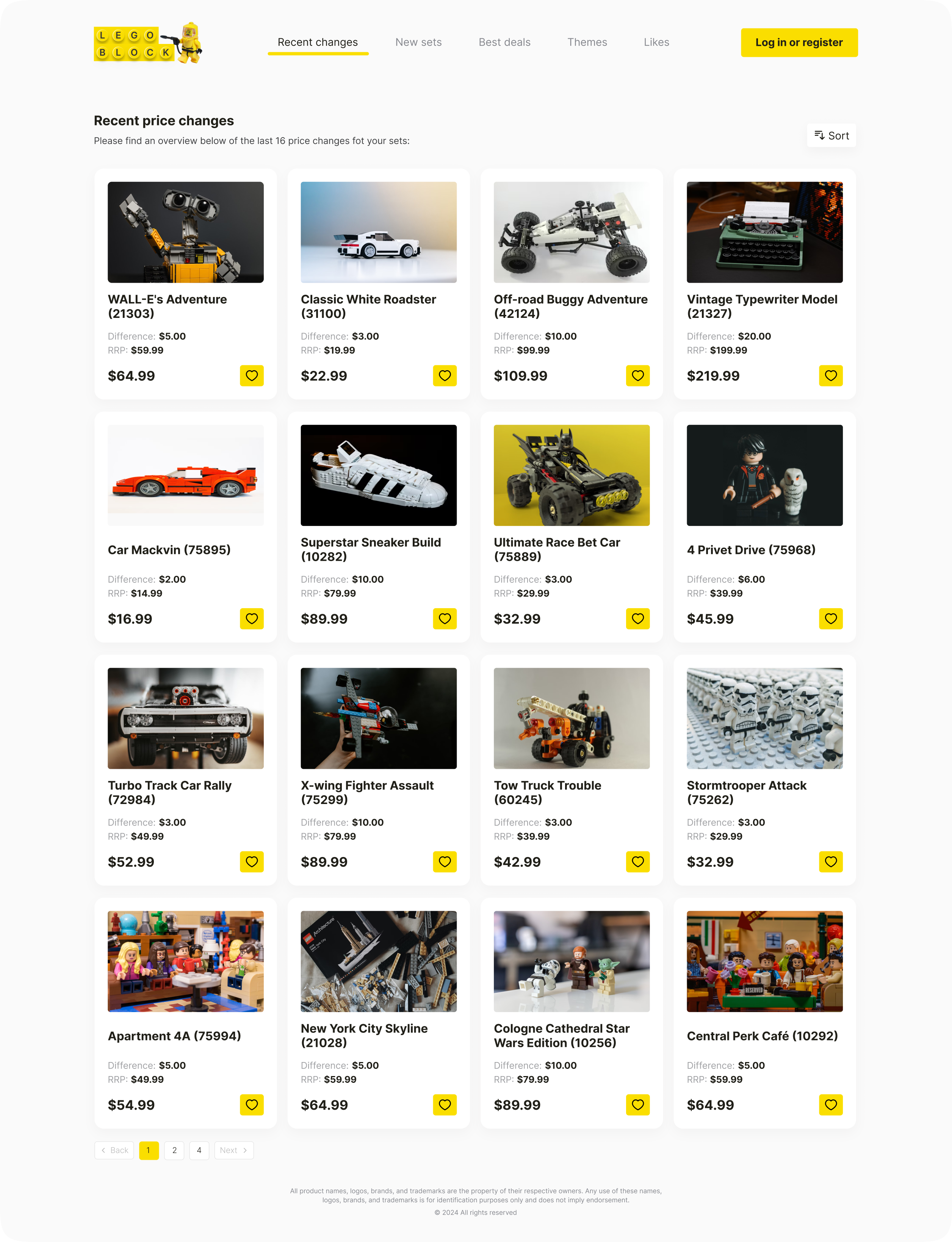
Prices move between visits. Spotting what changed meant re-checking the same sets one by one.
One feed for every movement
Recent Changes collects the latest price movements across sets in a single scannable grid, each with its change badge.
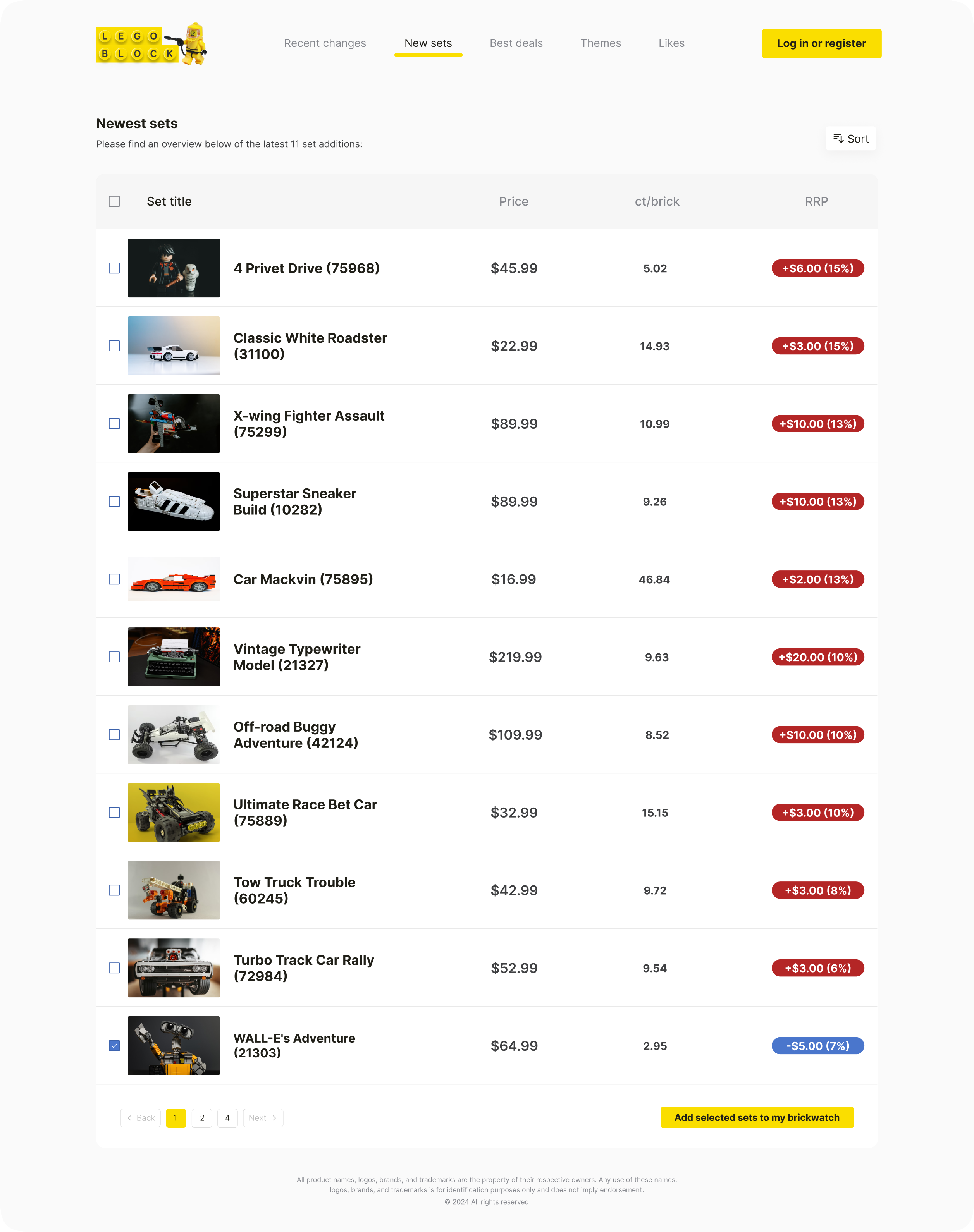
Sets of different sizes are hard to compare
A small set and a 3,000-piece set can’t be judged on price alone — the cheaper one isn’t always the better buy.
Value, not just price
The New Sets table puts price per brick and RRP side by side in sortable columns, so value is comparable across any set size.
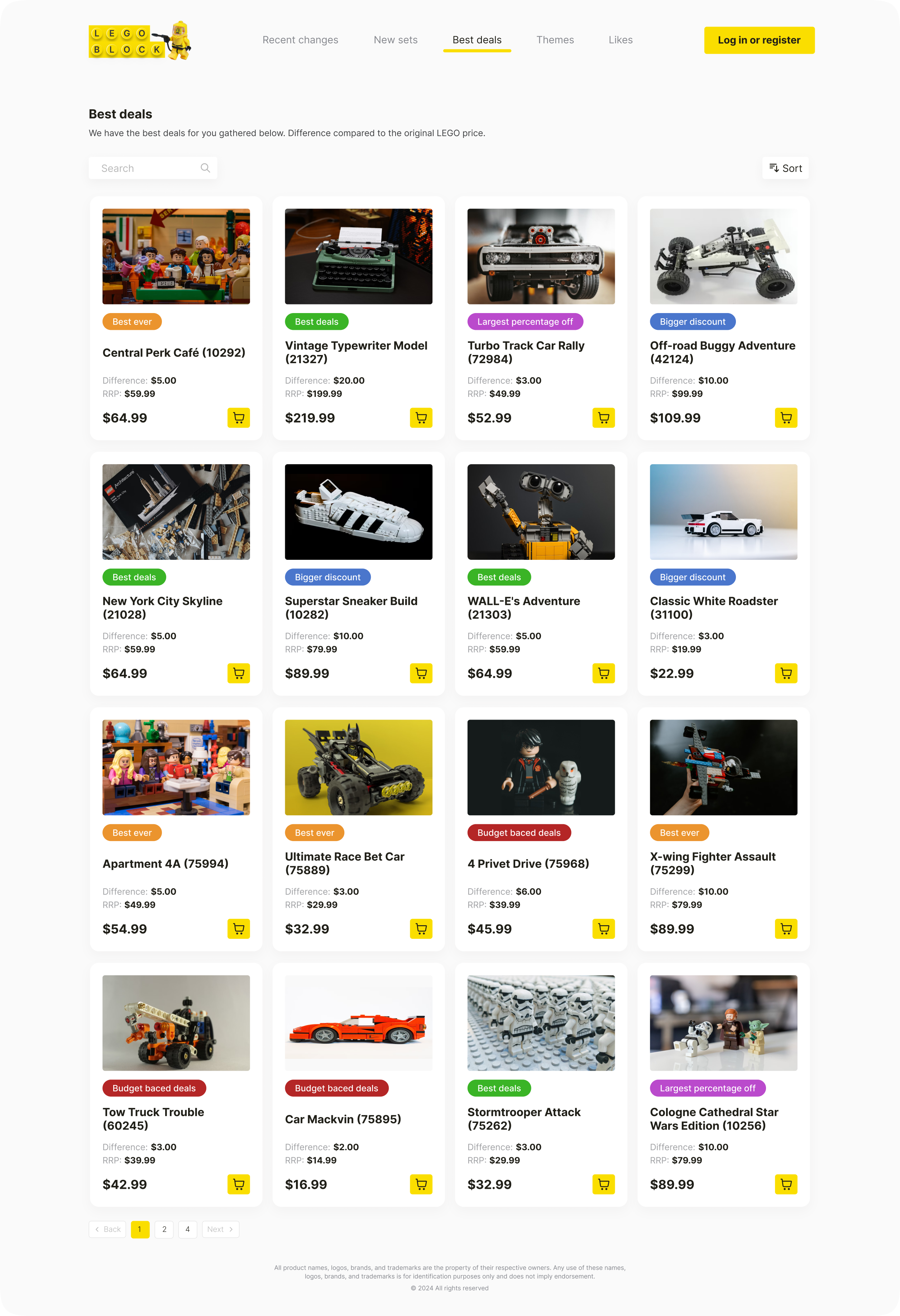
Every deal looks the same
A long list of discounted sets blurs together; the genuinely strong offers get lost in the noise.
Deals ranked at a glance
Best Deals uses colour-coded badges by discount type, so the strongest offers stand out before you read a single number.
Browsing and personal tracking were tangled
Discovery and “my sets” lived in the same places, so it was unclear where to go to explore versus where to check what you follow.
Two clear modes in the navigation
Browsing lives in Recent Changes, New Sets and Best Deals. Tracking is personal — Likes and Cart are yours alone. The split makes navigation obvious without onboarding.
- Recent Changes
- New Sets
- Best Deals
Passive discovery — what's moving in the market.
- Likes
- Cart
Personal — the sets you follow and plan to buy.
Dense data felt overwhelming
Thousands of sets, prices and changes on one screen quickly turns into a wall of numbers.
A strict visual hierarchy
White cards on a dark background, yellow as the only action colour, red and green reserved for price signals. You always know what matters most.
Brand
Built from the brick up
Before touching a single screen, I established a visual language rooted in LEGO's own DNA. Yellow is the hero — the same vibrant hue collectors know from every LEGO box. The supporting palette pulls directly from iconic LEGO brick colours.
Brand colours mapped to real LEGO brick colours — yellow, blue, grey, green, red.
Typeface — Inter
Inter carries the functional load. Clean, legible at every size, and neutral enough to step back and let the yellow accents and product photography do the talking. Used from 10px data labels all the way to 80px hero headings.
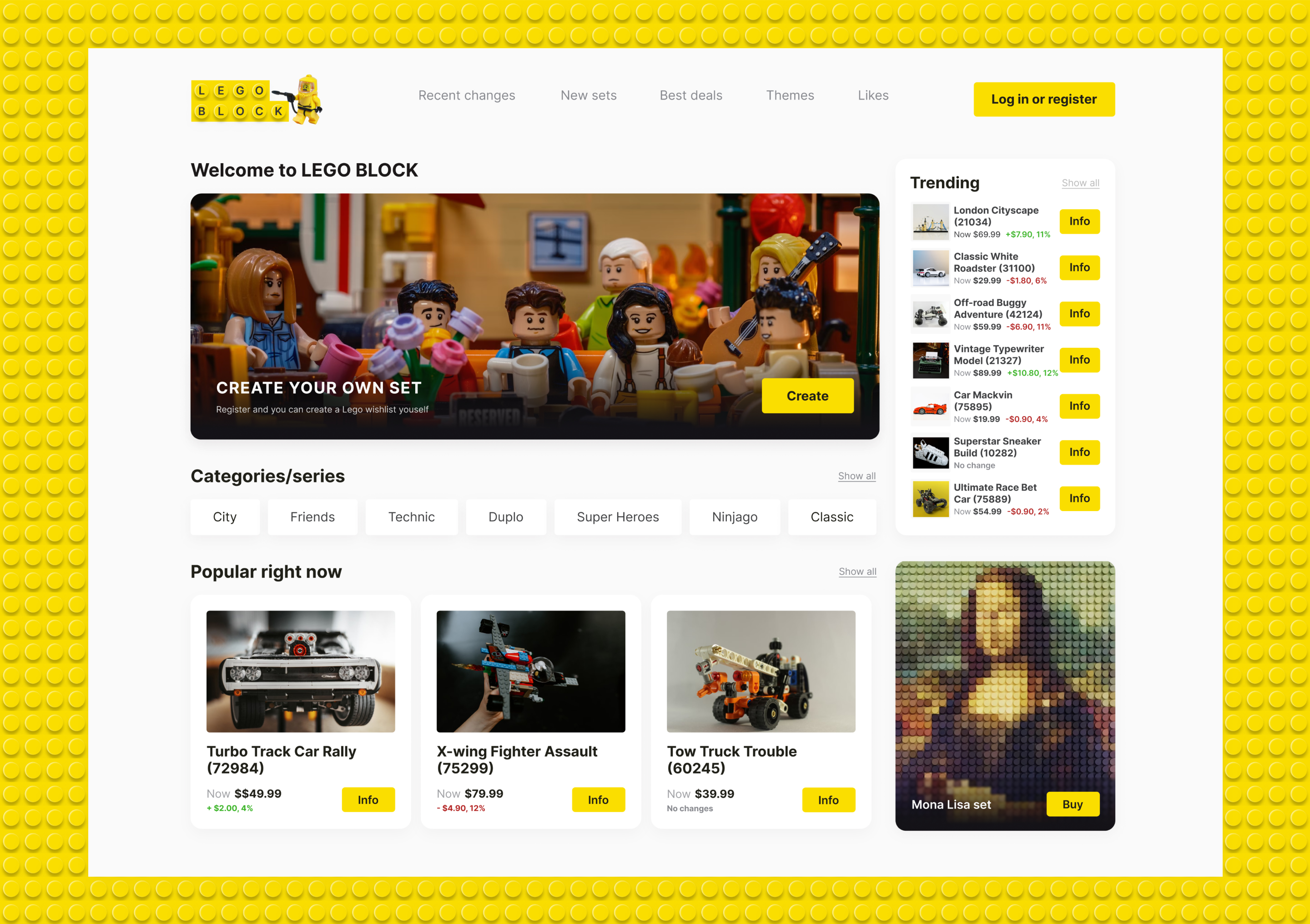
Home Page
Your first brick
The home page is where the journey starts. A returning user lands here and immediately sees what changed — trending sets, price movers, new arrivals. A new user gets a clear sense of the platform in seconds.
"Everything a LEGO collector needs to know — in one view, without scrolling."
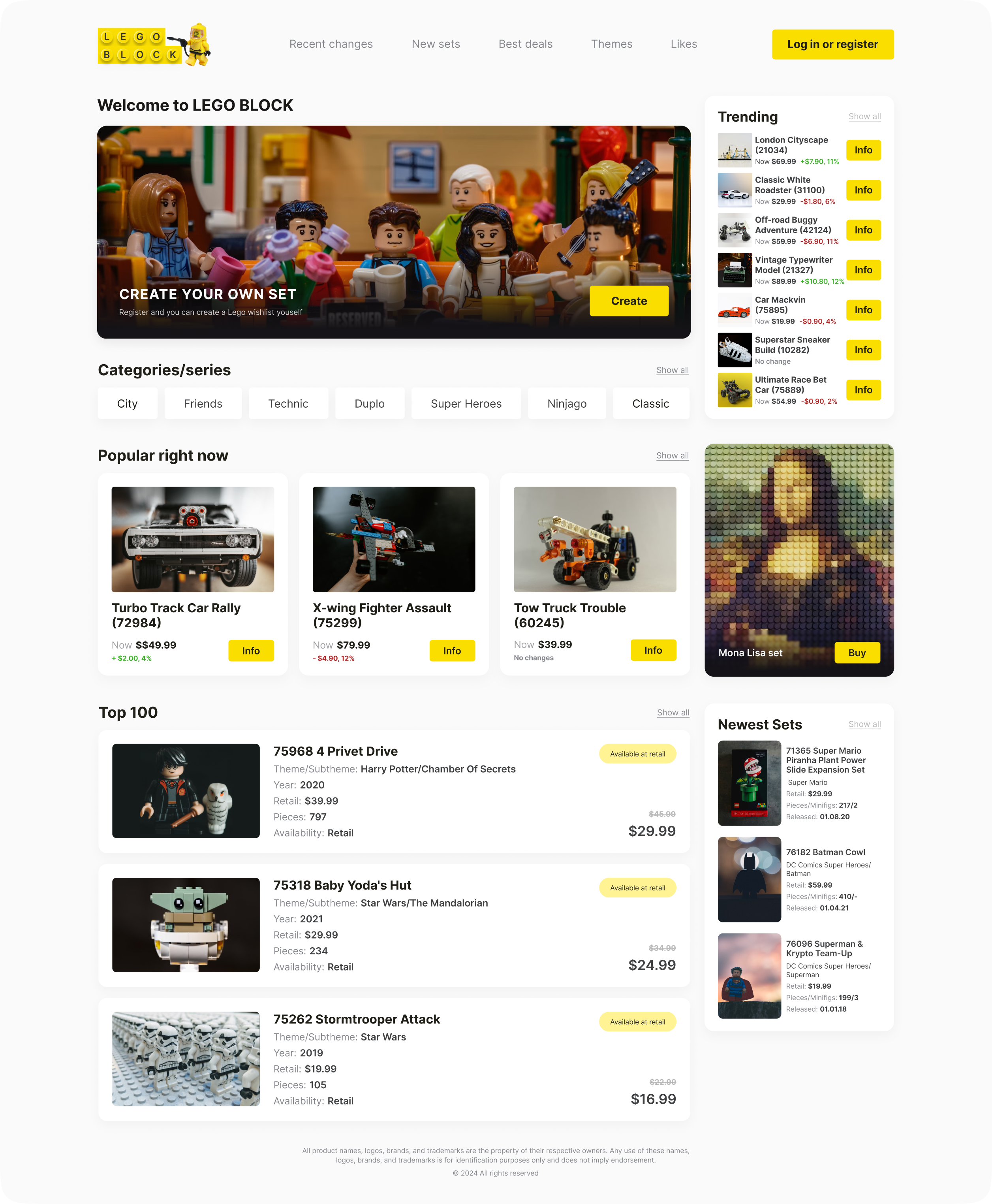
For: the gifter Home page — hero, trending sidebar, categories, popular sets and the Top 100 list.
Outcome
What was delivered
A complete product — 50+ high-fidelity screens covering every user flow from first visit to daily use. A full design system with components, colour tokens, and typography scale. A clickable Figma prototype.
"From spreadsheet chaos to a platform that works as hard as the collectors who use it."
Like what
you see?
I'm available for senior Product Designer roles and select freelance work. Let's build something together.